

The Family Shared Tablet Problem: Simple Setups That Prevent Chaos

Having one tablet for the whole family often seems like a convenient solution, but in practice, it quickly becomes a source of conflict. Without clear rules, even a simple gadget can turn into a source of arguments between children and adults. Learn more about how to set up a shared tablet properly to avoid chaos and make it convenient for all family members

A shared family tablet starts as a peace offering. One screen, one set of rules, everyone gets a turn. Then real life arrives. A game stays open, and someone “accidentally” deletes an app.
The tablet turns into a negotiation, and the problem is rarely the device. It is a missing system. A few setup choices can make a shared tablet boring again.
Earlier, we told you that European low-cost airlines have announced lucrative offers for spring and summer flights.
Planning a trip abroad?
Insurance from the Visit World portal will help you avoid unnecessary risks. The policy covers the costs of medical treatment, emergency assistance, and unforeseen situations abroad, so that even in the event of delays or route changes, you remain protected and can focus on your trip rather than on problems.

Set Up People, Not Apps
Most homes try to control a tablet by policing apps. Flip that approach. Separate people first, then let apps sit inside those lanes. Create a profile for each child and one for adults, with clear icons. Put school tools in kid profiles and keep adult accounts out of reach.
Lock new installs behind a parent passcode and hide the settings menu. This is also where you remove the “surprise rule” feeling around digital spend. If you use prepaid top-ups for certain stores, keep that choice inside the adult profile only.
When you need a quick reference like the Flexepin card price on Eneba, check it once, choose the right amount for your plan, then close the tab.
Give The Tablet A Home Base and A Clock
A shared device without a home base becomes a roaming distraction. Pick one spot, like a kitchen shelf or living room console, and make it the tablet’s parking place. If the tablet is not in use, it goes back. That habit cuts down on scavenger hunts and late-night scrolling in bedrooms.
Add time structure, but keep it humane. Tie it to the day. Homework comes before free time, and the tablet goes off at a set hour. A visible timer helps more than reminders.
Create Two Modes: Solo Turn and Family Mode
Most fights happen when people collide on the same screen. Give the tablet two identities. Solo turn means one person uses it at a time, headphones on, and hands off their session. Family mode is for shared activities, like a co-op puzzle or a movie night.
Family mode also benefits from a tiny reset ritual. Close apps when finished, clear recent tabs, and return the device to the home base. If your house uses prepaid codes, keep the reference point simple, for example, the Flexepin card price on Eneba, then move on.
A Budget Gaming Note That Helps the Tablet Stay Calm
Budget gaming is a value-first way to play, where you skip top-tier hardware upgrades and avoid full-price releases, then focus on discounts and what you already own.
In that strategy, Eneba helps you find discounted game keys or deals across a large catalog with competitive pricing, instant code access, clear platform and region labels, and secure payments. Product pages show Global and region-locked information directly on the page for transparency.
Eneba runs a controlled marketplace where merchants are verified, must follow compliance and sourcing standards, and are monitored; action is taken if rules are broken. That approach fits a shared tablet too, because limits feel clearer when the rules follow a simple plan.
Do A Tiny Weekly Check-In
Once a week, do a two-minute check-in. Ask what felt unfair, and what should stay the same. Then change one thing only. When the shared tablet runs on routines instead of reactions, it stops being a daily headline.
It becomes a tool, a treat, or a quiet default, depending on the hour each day. Digital marketplaces like Eneba offering deals on all things digital can support that calm by helping families plan entertainment choices without turning the tablet into a constant negotiation.
Are you preparing for a trip abroad in 2026?
Medical insurance from the Visit World portal will provide reliable support during your trip, especially in the context of flight changes and unstable schedules. The policy covers medical expenses, emergency assistance, and other unforeseen situations outside the country, so you can feel confident even when plans have to be adjusted at the last minute.
We remind you! Croatia is stepping up its fight against drunken tourists by introducing new restrictions in popular resort cities. Split became the first city in the country to introduce strict rules on alcohol sales this summer. Read more about the new bans, hefty fines for tourists, and changes in Croatia's tourism strategy.
Products from Visit World for a comfortable trip:
Travel guide for 200 countries;
Legal advice from a local specialist on visa and migration issues;
Travel insurance around the world (please select the country of interest and citizenship to receive services);
Medical insurance all over the world.
We monitor the accuracy and relevance of our information, so if you notice any errors or inconsistencies, please contact our hotline
Frequantly
asked questions
How can you organize the use of a single tablet for the whole family?
How can you avoid conflicts over tablet usage time?
Is it safe to buy digital goods through marketplaces?
How can you control spending on games and apps?
Recommended articles
2 min
Travels
Starting in April 2026, Venice will once again impose a fee on tourists visiting for a single day. This year, the restrictions will remain in effect for a longer period, and the number of days subject to the fee will increase. Learn more about the new rules, dates, and the cost of visiting the city
31 Mar. 2026
More details3 min
Travels
Border Day Meal Choices: What Travelers Eat When They’re Too Nervous to Taste Anything
Crossing the border is always stressful for the body, and it often affects your appetite. It’s important not to skip meals, but to choose the right foods to help you feel better. Learn more about what to eat while traveling and how to make your first day in a new country easier
31 Mar. 2026
More details3 min
Popular
The Quiet Stretch After You Hit “Submit”
Waiting for a visa is just as exhausting as the process of preparing the documents. It’s important to manage this time effectively to reduce stress and keep your expenses under control. Learn more about how to make this period more comfortable and manageable
01 Apr. 2026
More details3 min
Travels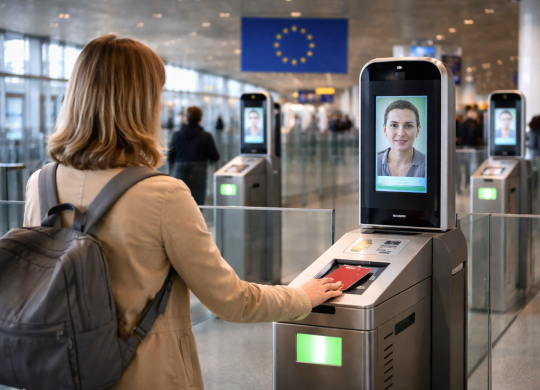
The EU will launch the EES in full operation starting in April 2026: new border crossing rules
The European Union is finalizing the rollout of a new border control system—the Entry/Exit System (EES)—which will be fully operational starting in April 2026. It replaces passport stamps with digital records and biometric data. Learn more about how the border crossing process will change and what you need to consider before your trip
01 Apr. 2026
More detailsAll materials and articles are owned by VisitWorld.Today and are protected by international intellectual property regulations. When using materials, approval from VisitWorld.Today is required.